
Transforming the Student Portal Experience at the University of the People

Embark on a journey of redesigning the University of the People Students Portal, where chaos transformed into clarity.

Transforming the Student Portal Experience at the University of the People

A UX case study on turning a confusing academic portal into a clear, student‑centered experience.

Timeline

Mar - Apr 2023

PLATFORM

Website/ WebApp

MY ROLE

UX Designer &
Researcher

Overview

University of the People (UoPeople) is a nonprofit, fully online university serving students around the world. The Student Portal is the primary place where students manage their academic lives accessing courses, tracking progress, completing tasks, and finding critical information.
When I joined the project, the existing portal had grown complex over time. Students struggled to find what they needed, complete tasks efficiently, and understand where to go next. The experience felt fragmented, technical, and difficult to navigate especially for busy students balancing coursework, jobs, and personal responsibilities.

Intro

University of the People (UoPeople) is an online university, founded in 2009. It’s nonprofit, has no physical campus, and students learn online. The admission office is in California.

Research

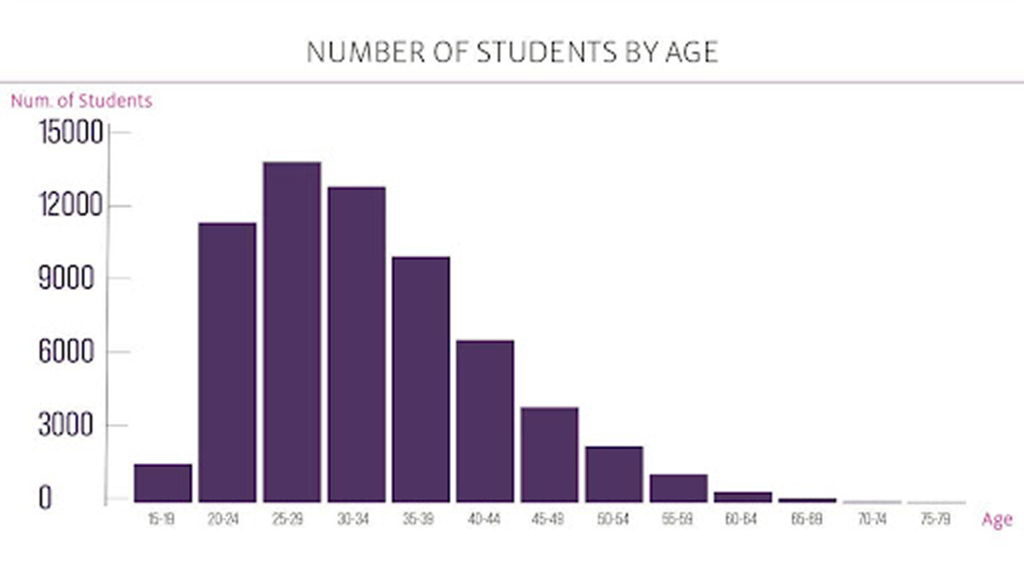
“When I first joined the University, I took a closer look at our student demographics and found that a significant chunk falls within the young age bracket, roughly between 20 to 40 years old. With this insight, I made a conscious decision to revamp our design strategy, aiming to establish a stronger connection with our youthful audience.

Task analysis

mapping key tasks such as running

PHASE 1 > DISCOVERY

Research Overview & Objective

Research Objective

Understand why students struggled with the existing Student Portal and identify opportunities to improve clarity, navigation, and task completion.

Core Question

"How can we redesign the Student Portal so students can quickly understand their academic status and take action without confusion?"

PHASE 1 > Methodology

Research Methods

We utilized a mixed-methods approach to gather both quantitative data and qualitative context.

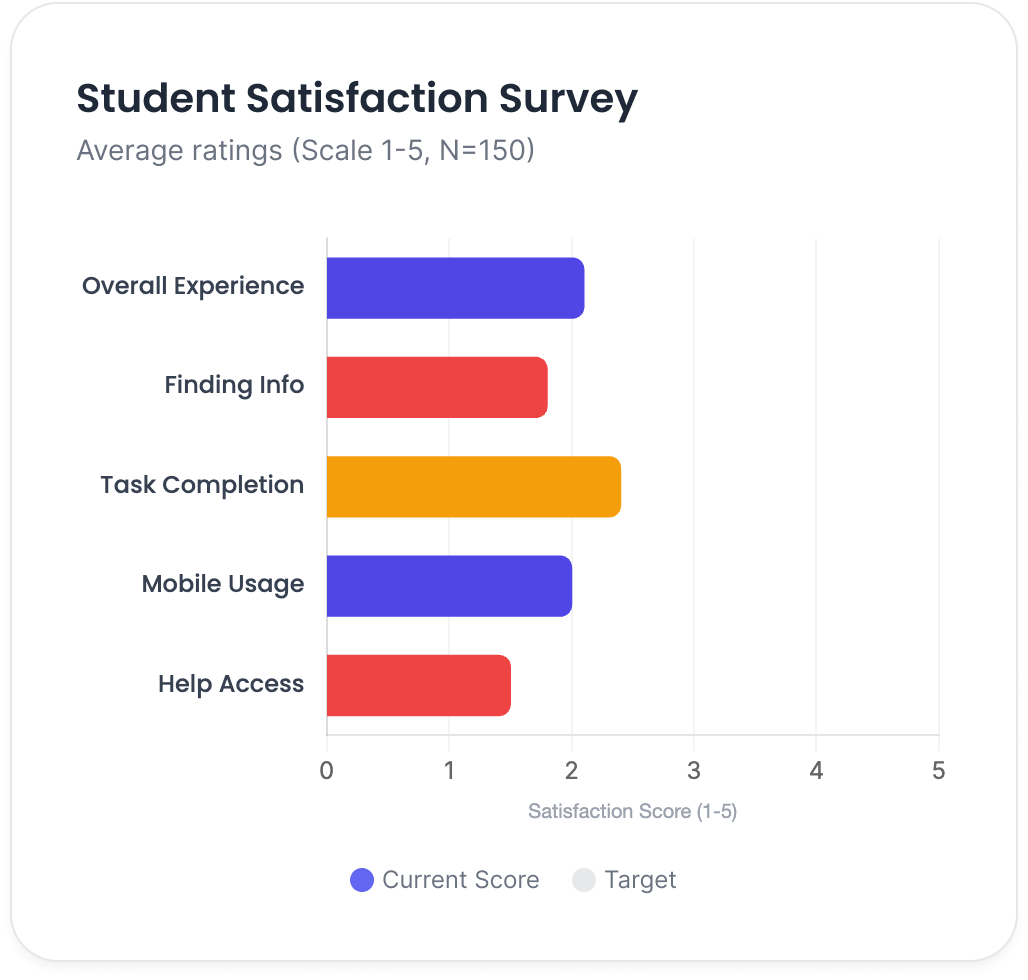
Overall Satisfaction

Why This Method
Identify patterns at scale to understand the prevalence of issues across the student body.

1:1 Interviews

Why This Method
Understand frustrations in context and hear the "why" behind the data directly from students.

Usability Review

Why This Method
Uncover structural UX issues and heuristic violations in the current interface design.

Task Analysis

Why This Method
Reveal friction in real workflows by breaking down common student actions into steps.

PHASE 1 >Research Output

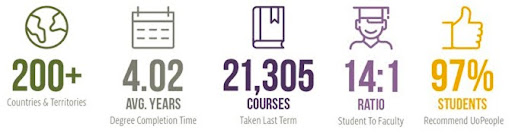
User Demographics & Context

Understanding who our students are and the constraints they operate under.

Qualitative Themes

Information Discovery

Finding basic course information was described as "difficult" and "buried," leading to support tickets.

Task Efficiency

Finding basic course information was described as "difficult" and "buried," leading to support tickets.

Priority Themes for Redesign

PHASE 1 > Methodology

Research Methods

We utilized a mixed-methods approach to gather both quantitative data and qualitative context.

Overall Satisfaction

"How satisfied are you with the current Student Portal experience?"

Information Retrieval

"How easy is it to find your specific course information?"

Task Efficiency

"Can you complete study-related tasks efficiently without help?"

Experience Rating

"How would you rate the overall user experience on a scale of 1-10?"

Gap Analysis

"What critical features are currently missing or difficult to use?"

Key Frustrations

"What frustrates you the most while using the portal daily?"

PHASE 1 > Key Findings

Research Insights

Quantitative data and qualitative feedback reveal significant friction.

Primary Audience

20–40

Average age range of active users

Learning Mode

Fully Online

Remote learners requiring high system reliability

Balancing Act

Key Behavioral Insight

Students interact with the portal in short, focused sessions. They are time-poor and need
clarity immediately—not after exploration.
Research Synthesis

Design Goals

Based on our research findings, we established five core principles to guide the redesign.

Reduce Cognitive Load

Minimize clutter and steps to help students process information without mental strain.

Predictable Navigation

Create consistent pathways so students always know where they are and how to return.

Centralize Information

Group key academic status, grades, and tasks in one unified, easy-to-find location.

Quick Decision-Making

Highlight actionable items clearly to help students decide what to do next instantly.

Friendly & Modern

Use a clean, approachable aesthetic to make the system feel supportive rather than strict.

Problem

Since [Year], Uo people portal experience has not been changed. Here are the key problems with the core experience.

PROBLEM

Navigation Complexity

Finding what you need in the Students Portal can be a bit tricky and frustrating. It’s like looking for a needle in a haystack, and that makes things slower and a bit of a hassle.

Defining the problem

" Craft a user-friendly portal where everything a student needs is just a click away. "

User persona

Busy student Emma Mitchell needs a Students Portal that’s super easy to use. She wants quick access to important info, smooth task management, and a simple, friendly experience. Without these tweaks, Emma’s academic journey might hit a few bumps, affecting her productivity and overall satisfaction.

Defining the problem

user persona

Emma Mitchell

Emma

  • Age: 23
  • occupation: Computer Science Student

Goal

  • Stay on top of things: Emma aims to keep her course stuff organized – assignments, deadlines, you name it!
  • Easy info access: Emma just wants to breeze through important university info without breaking a sweat.

Pain point

  • Balancing classes, part-time work, and personal life? Emma’s feeling the time crunch.
  • Emma’s on a quest to find specific course materials on the student portal – a bit like searching for a needle in a haystack.

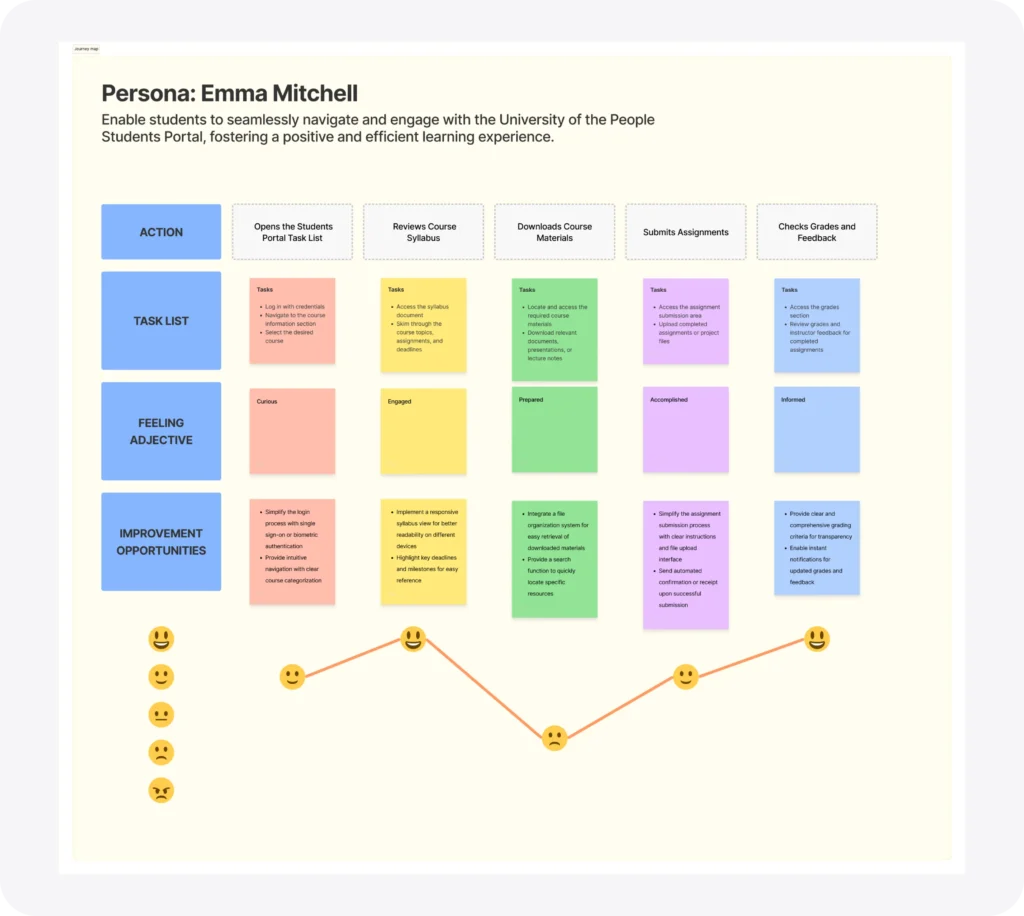
User Journey Map

Facilitate students’ seamless interaction and navigation through the University of the People Students Portal, cultivating a productive and favourable learning encounter.

Research Methods

We utilized a mixed-methods approach to gather both quantitative data and qualitative context.

Login

Low Friction

Standard authentication process.

Find Course

Pain Point

Repeated navigation between pages required just to locate current class.

Check Tasks

Major Friction

Too many clicks to reach specific assignment details. Information buried.

Take Action

Pain Point

No clear "next step" or confirmation after submission.

Log Out

Neutral

Session end.

Starting the Design Process

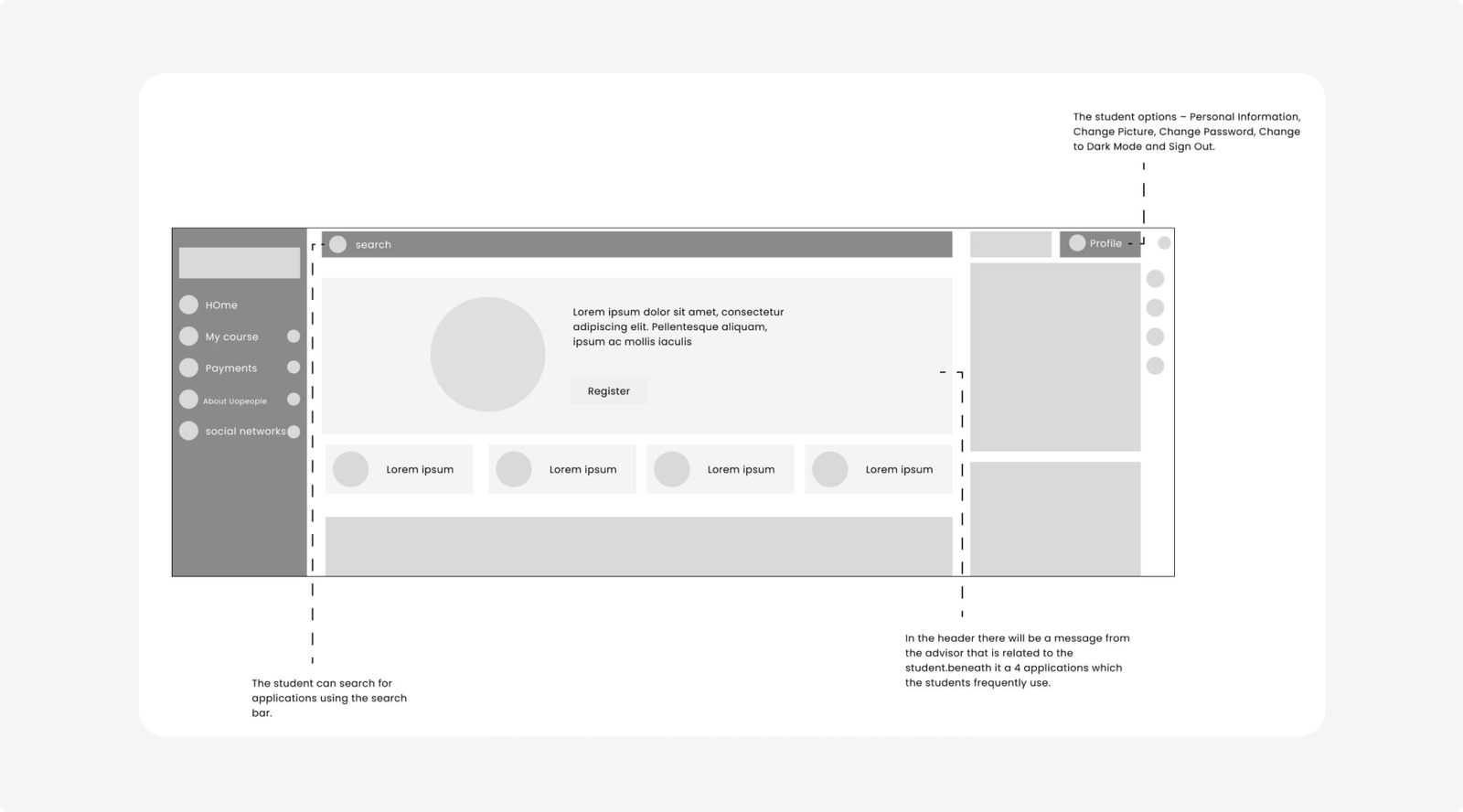
Digital Wireframe

Transitioning from paper to digital wireframes clarified how the redesign could alleviate user challenges and enhance the user experience.
Strategically prioritizing button placements and visual elements on the home page played a pivotal role in my approach.

Starting the Design Process

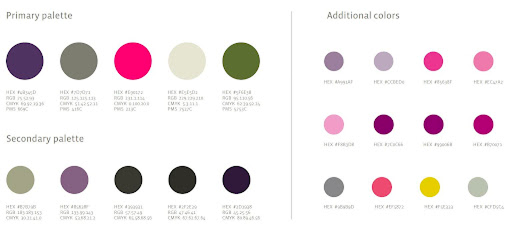
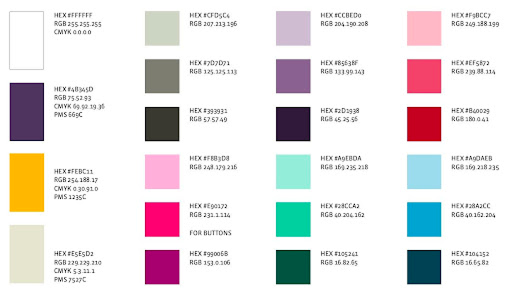
Colors at Uopeople aren’t just hues; they’re emotions on a canvas. From welcoming brights to cozy tones, each color tells a story of warmth and connection. It’s not just about what you see; it’s about how you feel. Every color is a brushstroke, creating an atmosphere of good vibes and homey comfort.

All About You:

We tried out different looks, tweaking the colors and putting the spotlight on “People” to shout out that we’re the gateway to higher education.

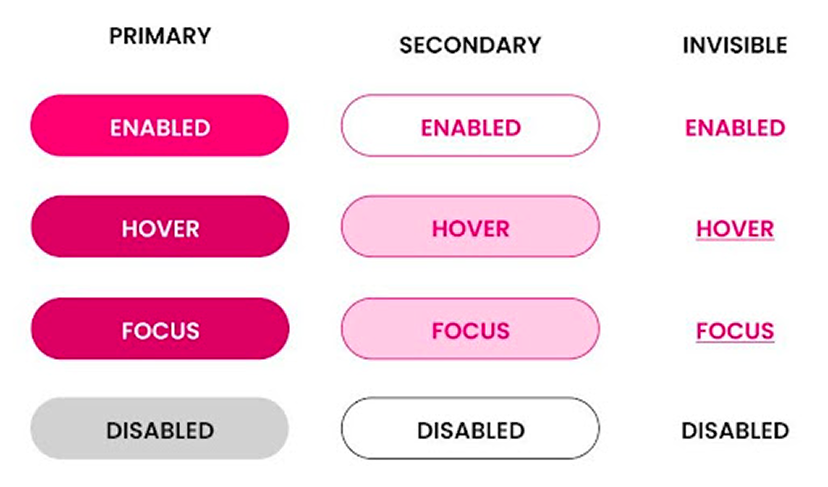
components

All About You:

We revamped our buttons to make sure your experience is top-notch and super easy.

Old vs. New Dashboard:

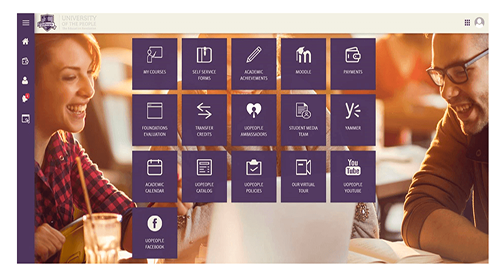
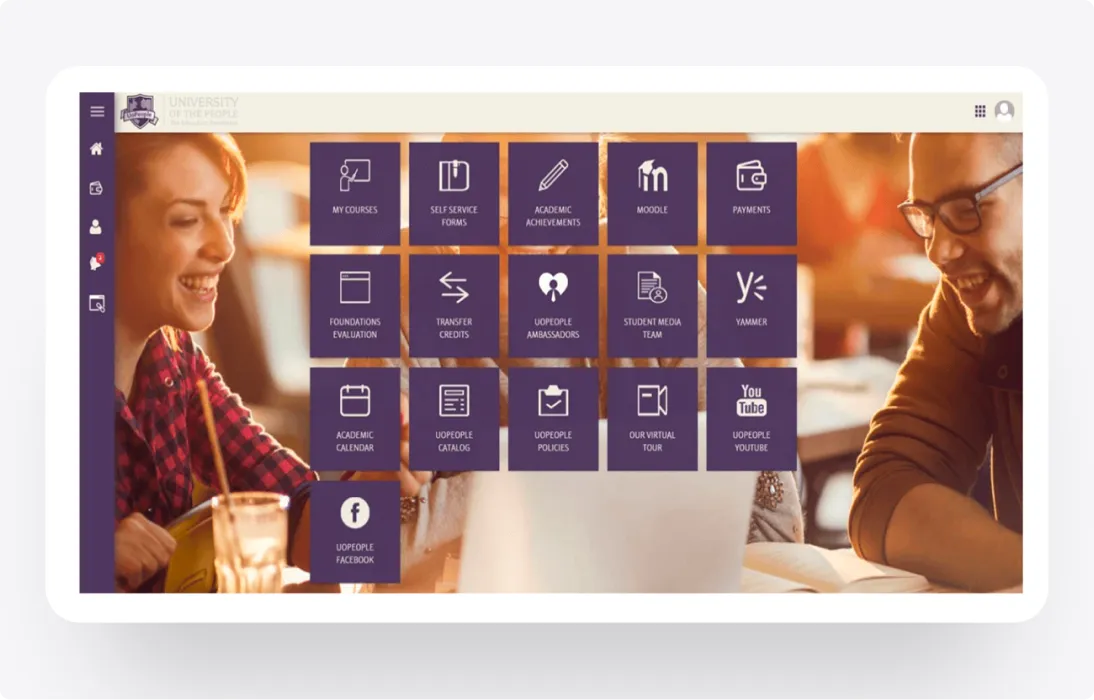
Old Dashboard

A metro of University apps, where students must enter each one to find information and take action.

Navigation Complexity

Finding what you need in the Students Portal can be a bit tricky and frustrating. It's like looking for a needle in a haystack, and that makes things slower and a bit of a hassle.

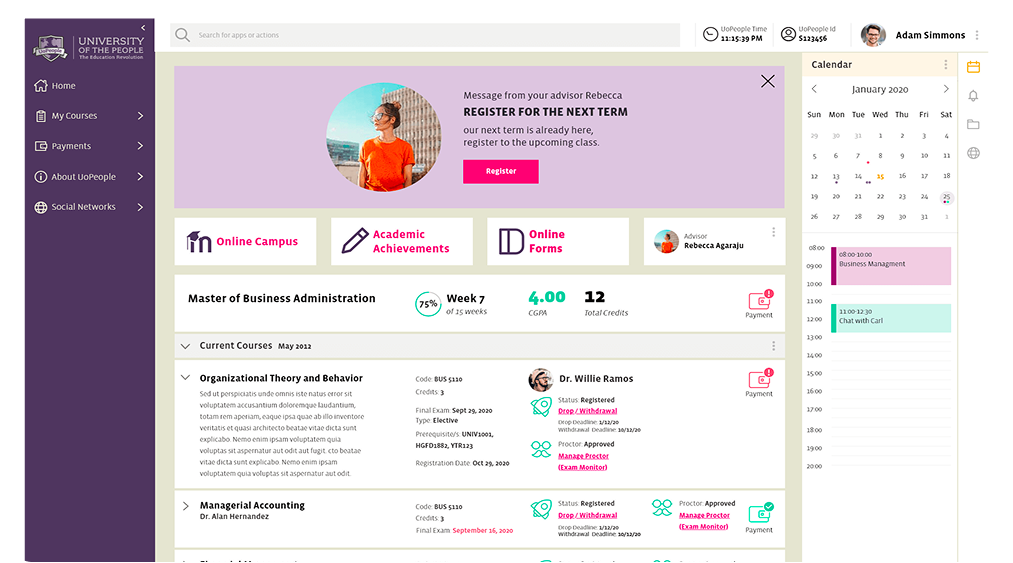
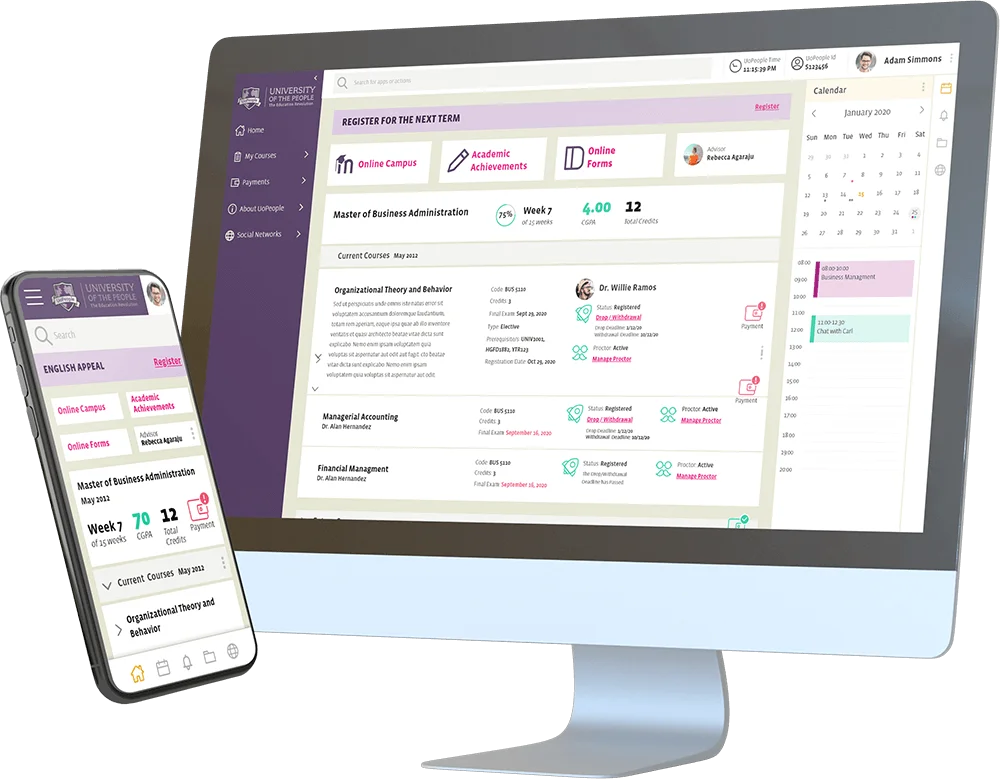
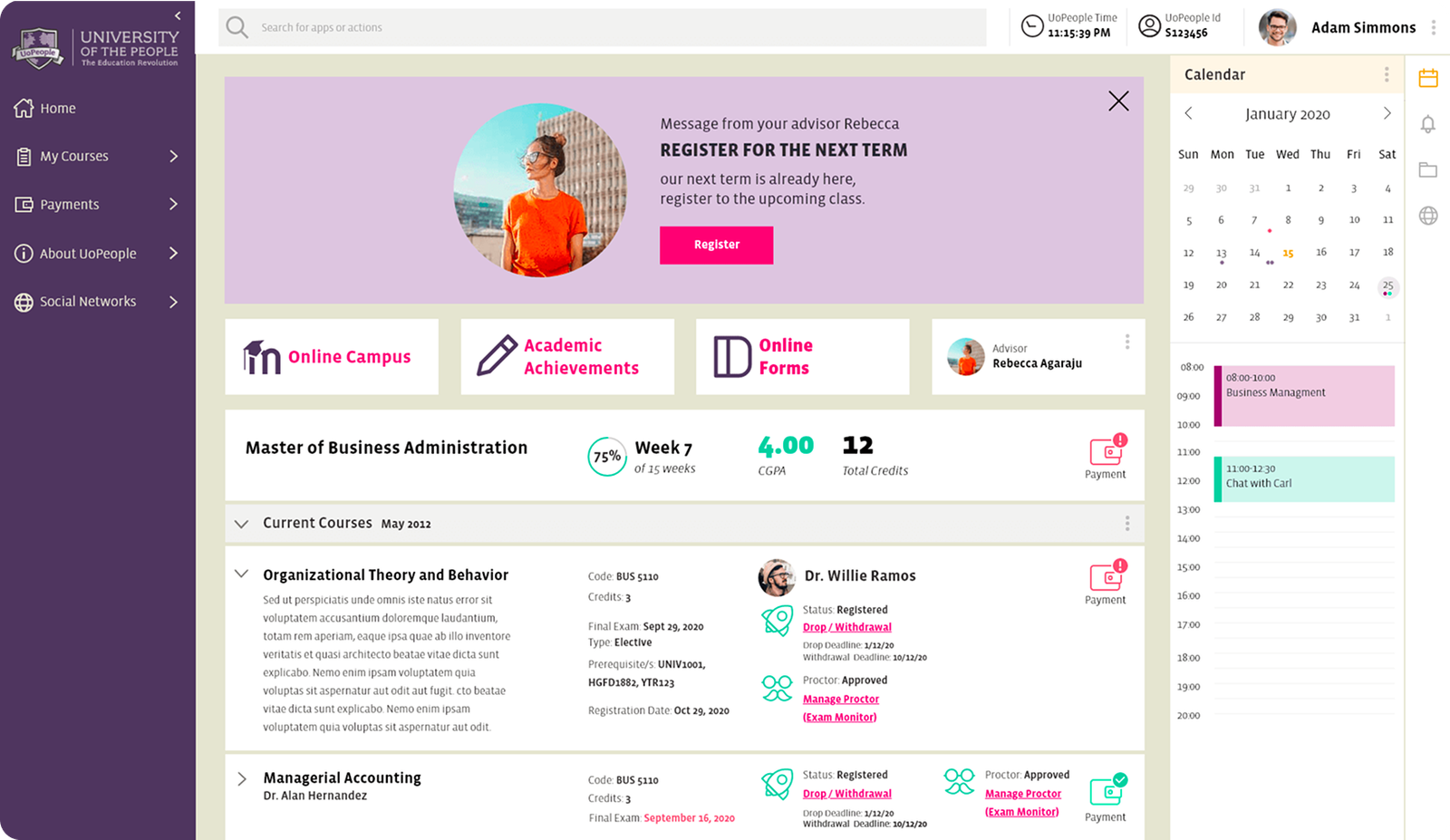
New dashboard

In the crazy world of online education, our fresh look didn't just catch the eye of our audience; it pushed Uopeople into more engagement and growth. Our design isn't just a pretty face; it's the heart of our success story, shaping our digital vibe and bringing students from every corner of the world closer together.

Conclusion:

Big Changes, Big Impact:

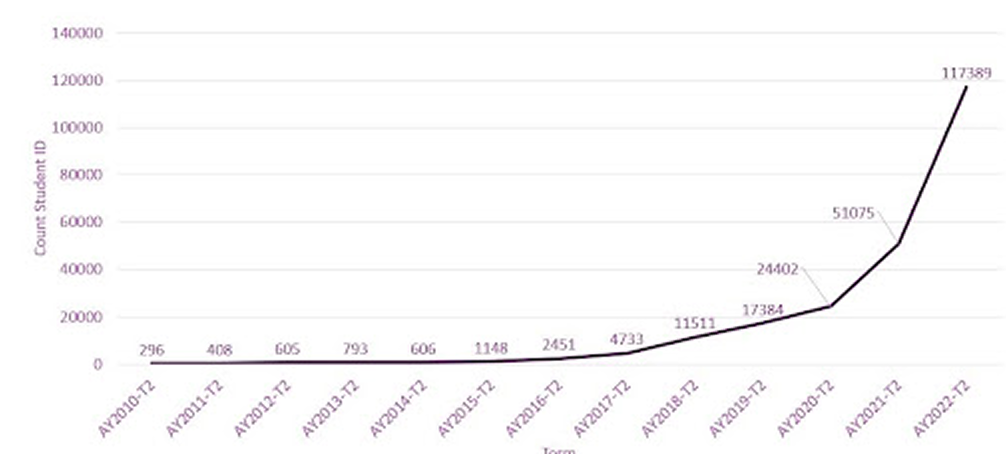
Guess what? Our design adventure wasn't just for fun. It led to a major boost in registrations! The cool color palette, chill logo, and user-friendly tweaks made a real difference.

In the crazy world of online education, our fresh look didn't just catch the eye of our audience; it pushed Uopeople into more engagement and growth. Our design isn't just a pretty face; it's the heart of our success story, shaping our digital vibe and bringing students from every corner of the world closer together.

Let’s connect!

Thank you for your time reviewing my work If you’d like be more or get in touch, my contact information is provided below.